
 When to Use a Trip Planner
Short EV trips (less than 100 miles round-trip) generally do not require a dedicated trip planner. You will most likely depart with more than enough charge to complete the round trip. Your vehicle’s internal navigation, Android Auto, or Apple CarPlay navigation is usually all the “trip planning” you will need.
Longer trips (greater than 100 miles round-trip) may benefit from more detailed trip planning. Some vehicles provide adequate built-in navigation for long trips, but if you find your internal navigation system limiting, third-party route-planning apps can be helpful.
In my opinion, ABRP (A Better Route Planner) provides the most flexible, in-depth, vehicle-specific, charging-network-neutral route planning available.
There are other third-party trip-planning apps available, such as PlugShare and ChargeWay. In addition, each charging network—such as ChargePoint, Electrify America, EVgo, Tesla, etc.—may offer its own route planner within its charging app. These planners are usually proprietary and limited to that company’s charging network.
For example, the Electrify America app will only route you to Electrify America stations and will ignore competing networks.
Vehicles with built-in Google Maps (when linked properly) can perform EV-aware route planning based on expected energy usage.
Additionally, Google Maps can provide EV route planning on mobile if you specify that you drive an EV and indicate which adapters you have.
Know Your EV’s Charging Options
For effective trip planning, it is helpful to understand which types of charging stations your EV can use and how quickly you can expect to charge.
There are three main charging levels:
Level 1 – 120V AC
• Adds approximately 4–8 miles of range per hour
• Suitable for basic home charging
• Very slow for trip use
Level 2 – 240V AC
• Adds approximately 15–40 miles of range per hour
• Ideal for home charging
• Acceptable for destination charging on road trips
DC Fast Charging
• Can deliver up to 350 kW (vehicle-dependent)
• Can charge up to ~80% in as little as 20 minutes
• Preferred option for road trips
Charging speed depends on several factors, including:
-
The maximum power your vehicle can accept
-
Battery temperature
-
Ambient temperature
-
Current state of charge (e.g., 10%, 50%, 80%)
Refer to your vehicle’s specifications for details.
EV Charging Port Types
There are four major EV charging port types currently in use in the U.S.
| 1. J1772 (Type 1)
The Standard AC port Used for Level 1 (120V) and Level 2 (240V) charging. Standard on all non‑Tesla EVs for AC charging. Tesla vehicles can use J1772 with an adapter. Delivers up to 19.2 kW depending on the charger and vehicle. It is rare to find a J1772 port alone – without the combined with the CCS1 (Combined Charging System) port. |
2. NACS (North American Charging Standard)
Also referred to as SAE J3400 NACS is rapidly becoming the new U.S. Charging Standard Formerly Tesla‑exclusive; now being adopted by many automakers. Compact design that supports both AC and DC Fast-Charging. Tesla Superchargers can deliver up to 250 kW. Many but not all Tesla superchargers support non-Tesla EV charging. Many non-Tesla charging networks are adding NACS connectors.
|
| 3. CCS1 (Combined Charging System)
Currently the Dominant DC Fast‑Charging Standard Combines the J1772 AC port with two additional DC pins. Supports both AC and DC Fast-Charging. Used by most U.S. automakers and all major public fast‑charging networks. Can deliver up to 350 kW on high‑power DC Fast-Chargers. Most EV manufacturers support CCS1 to NACS adapters which can be used to charge from some NACS charging locations. |
4. CHAdeMO
The Legacy Japanese DC Fast‑Charging Standard Early DC fast‑charging system used by vehicles like the Nissan LEAF. Now declining in the U.S., with limited future support. Mostly found on used EVs Offers bi‑directional charging capability (vehicle‑to‑grid). Available at fewer stations compared to CCS and NACS. |
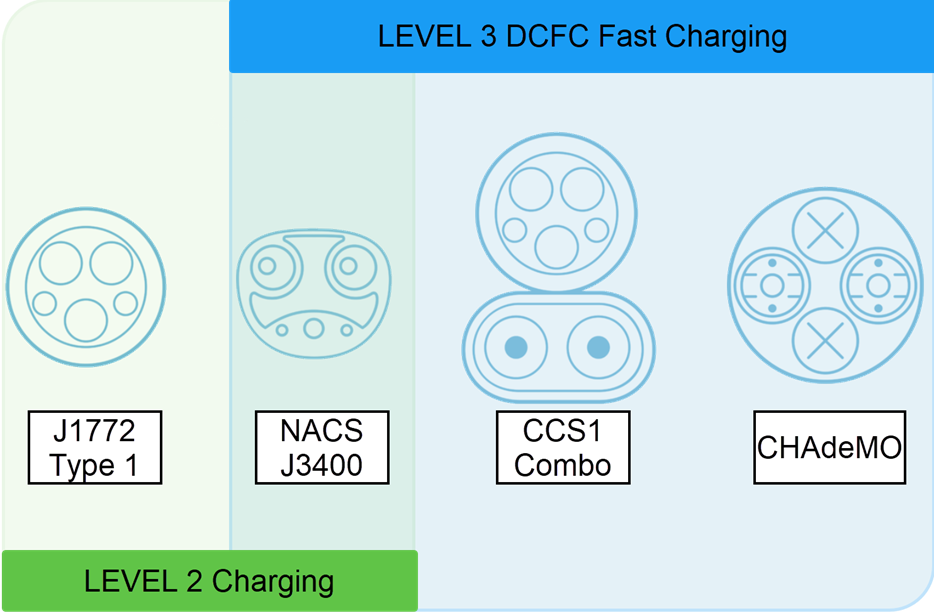
Most EV manufacturers selling vehicles in the U.S. are transitioning toward NACS as a common standard. During this transition, EVs currently on the road may use any of the four port types described above.
The good news is that ABRP automatically accounts for your specific vehicle’s charging capabilities, including:
-
Port type
-
Charging speed
-
State of charge
-
Adapter compatibility
About ABRP
ABRP offers both free and premium versions.
Free Version
-
Considers seasonal weather patterns (e.g., reduced winter range)
Premium Version
-
Uses real-time traffic and weather data
-
Integrates with Apple CarPlay and Android Auto
ABRP works on iPhone, Android, iPad, and desktop computers.
Setting Up ABRP
Since you will use ABRP on your phone while driving, I recommend installing the mobile app first and following the prompts to enter your vehicle information.
Once signed up, your account and saved routes will sync across all devices.
Recommended Settings (Non-Default)
-
Departure State of Charge (SoC): 100%
Assumes you leave home fully charged and serves as the basis for trip calculations.
(Premium users may link real-time vehicle SoC.) -
Charging Stops: “Short but many”
Creates more frequent, shorter stops and a more relaxed trip pace. -
Destination Arrival SoC: 20%
Ensures a buffer upon arrival. -
Charger Arrival SoC: 20%
Prevents arriving at chargers with very low battery levels.
Refer to the next page for screenshots of these settings.

Using ABRP to Plan a Trip
I prefer planning trips on a computer for better visibility, though the same steps apply on mobile devices.
-
Open a browser and go to abetterrouteplanner.com
-
Log in if prompted
-
Enter your departure location (e.g., Concord, MA)
-
Enter your destination (e.g., Bar Harbor, ME)
-
Optionally add stops (e.g., LL Bean in Freeport, ME)
-
Select the correct vehicle and enter current SoC
-
Use More Options to reverse or round-trip the route
-
Click Plan
ABRP will calculate the route and recommend charging stops.
Understanding the Results
-
Total trip: 288 miles, 5h 10m
-
Drive time: 4h 55m
-
Charging: One 12-minute stop (Tesla Supercharger, Augusta, ME)
-
Arrival: 40% SoC (departure at 4:55 PM, arrival at 10:05 PM)
Plans can be saved or shared to Google Maps or Apple Maps.


About the ABRP Map
-
Blue route: Recommended path with charging stops
-
Gray route: Alternate (slower) route without charging details
Charger icons indicate network brands. I recommend installing and registering all charger apps you expect to use before traveling. Each network offers a free version.
You can also exclude specific charging networks and recalculate your route.
Example: Starting With Low Charge
Starting with 20% SoC and requiring 60% at destination resulted in:
-
Multiple charging stops
-
A total trip time of 7h 5m
-
Longer duration due to low starting charge
